
PCC Secure Partner Portal
PCC Secure Partner Portal
Replacing an ad hoc, email-driven workflow with a centralized, permission-aware system for a healthcare nonprofit.
The Primary Care Coalition, a Montgomery County healthcare nonprofit, was sharing partner-facing files — many containing PII and PHI — almost entirely over email. We replaced that ad hoc workflow with a centralized, permission-aware system: a redesigned public site linked directly to their existing SharePoint structure, delivered live at handoff rather than as a spec.
Partner data was moving through email — a compliance risk, not just an inconvenience
PCC coordinates closely with external partners across its program areas, sharing reports, flyers, and program documents that frequently contain Personally Identifiable Information (PII) and Protected Health Information (PHI). That sharing happened almost entirely through informal, ad hoc channels — primarily email — with no centralized location, no role-based access control, and no consistent governance over who could see what.
For a healthcare organization, this isn’t just inefficient — it’s the highest-consequence failure mode. A single PHI exposure can trigger HIPAA penalties starting at $100 per record. PCC needed a system, not a workaround.
PII/PHI shared through informal channels with no role-based access controls, exposing PCC to real HIPAA risk.
No single, persistent entry point partners could rely on to find what they needed.
Sharing meant manually managing email-based access with no structural enforcement.
Updating a document meant re-sharing it entirely, risking overwritten or outdated source files.
Staff re-sent the same flyers and reports repeatedly because there was no shareable, persistent link.
The problems weren’t random — they were systemic
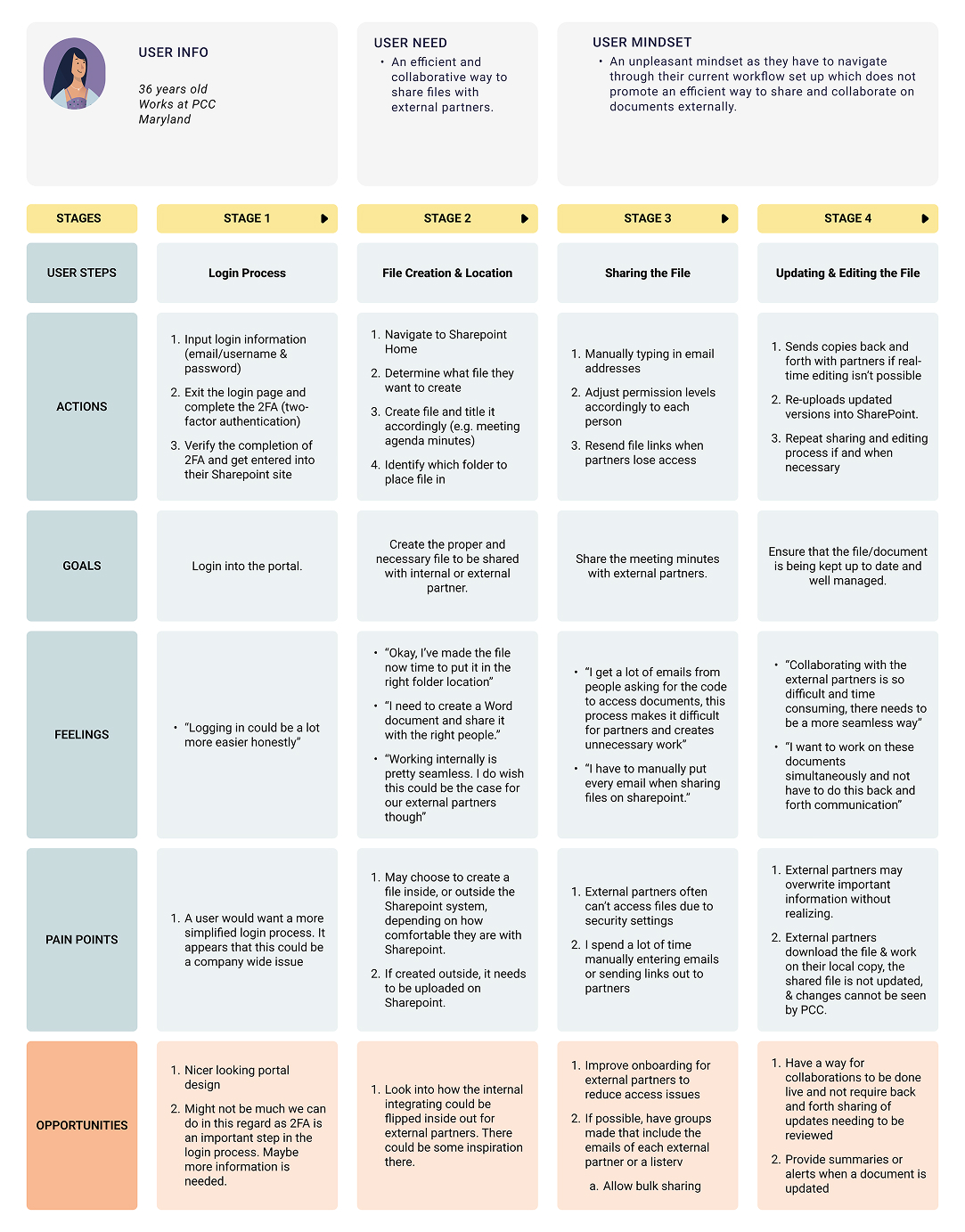
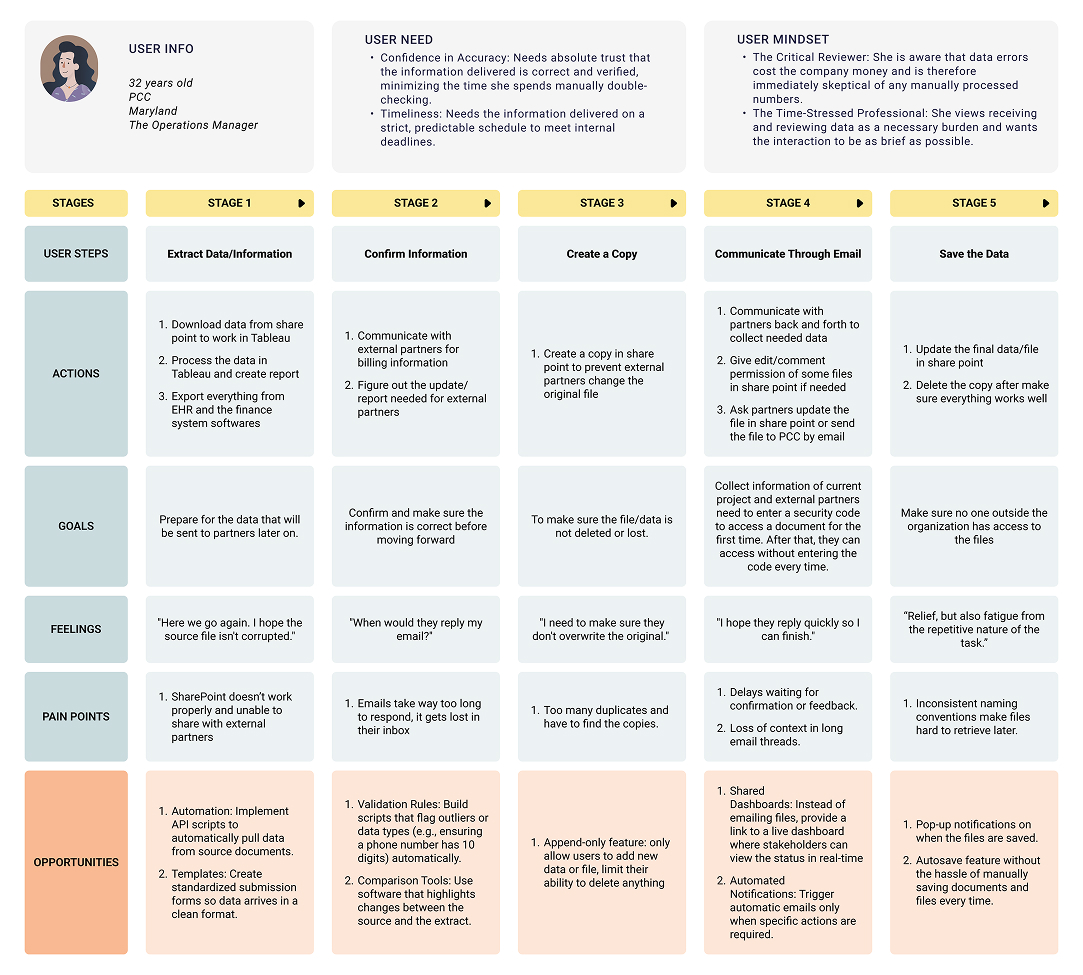
I led in-depth interviews with PCC staff across all major program areas — Administrative & Senior Leadership, Population Health, and Healthcare Access — asking each participant to walk through how they currently share information with external partners. To pressure-test the findings, I built two journey maps from two very different roles. They reach the same systemic gap — SharePoint can’t share cleanly with external partners — from opposite ends of the workflow.
The general staff member
A PCC employee who creates and shares files day to day. Internal collaboration feels seamless — but the moment a document needs to reach an external partner, the workflow breaks down into manual email, re-shared links, and back-and-forth versioning.
The Operations Manager
A critical reviewer who must trust the accuracy of partner data and deliver it on a strict schedule. She arrives at the same gap from a data-integrity angle — duplicate copies, lost email threads, and access codes that make every exchange slow and risky.
Turning raw research into a direction
I led an affinity-mapping session to bridge what we heard and what we’d build. Findings were organized along two axes: the Current State of PCC’s collaboration environment — SharePoint tech struggles, training gaps, and partner painpoints — and the Future State staff and partners wanted: desired features, cleaner external-partner access, and granular access controls. Those Future-State clusters became the requirements that drove every design decision that followed.
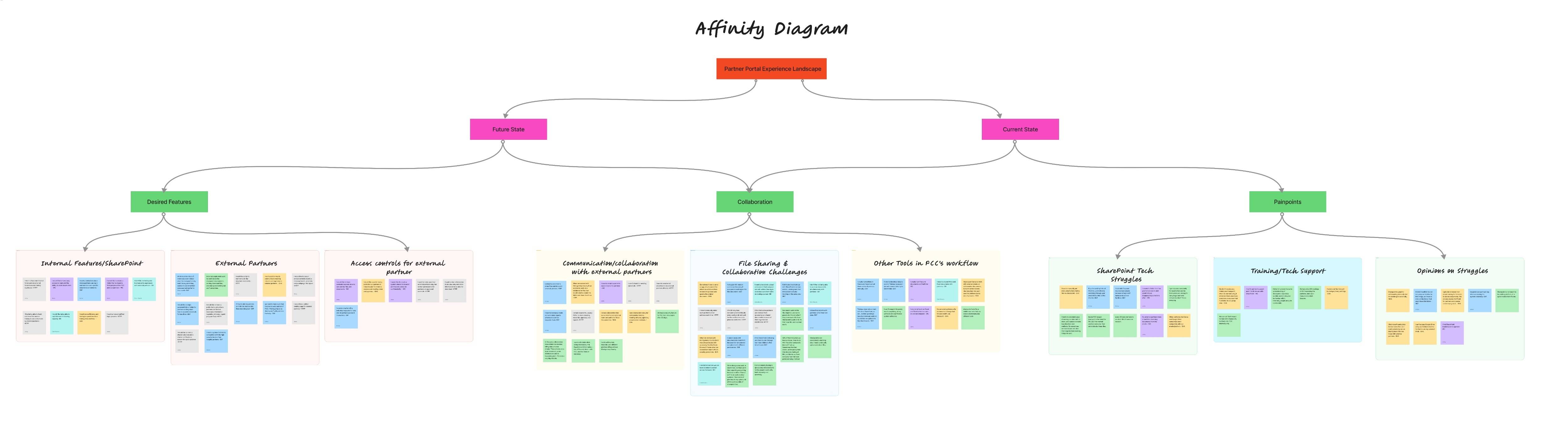
SharePoint tech struggles, training & tech-support gaps, and partner painpoints around accessing and collaborating on files.
A centralized hub, cleaner external-partner collaboration, and granular access controls for external partners.
A first design hypothesis
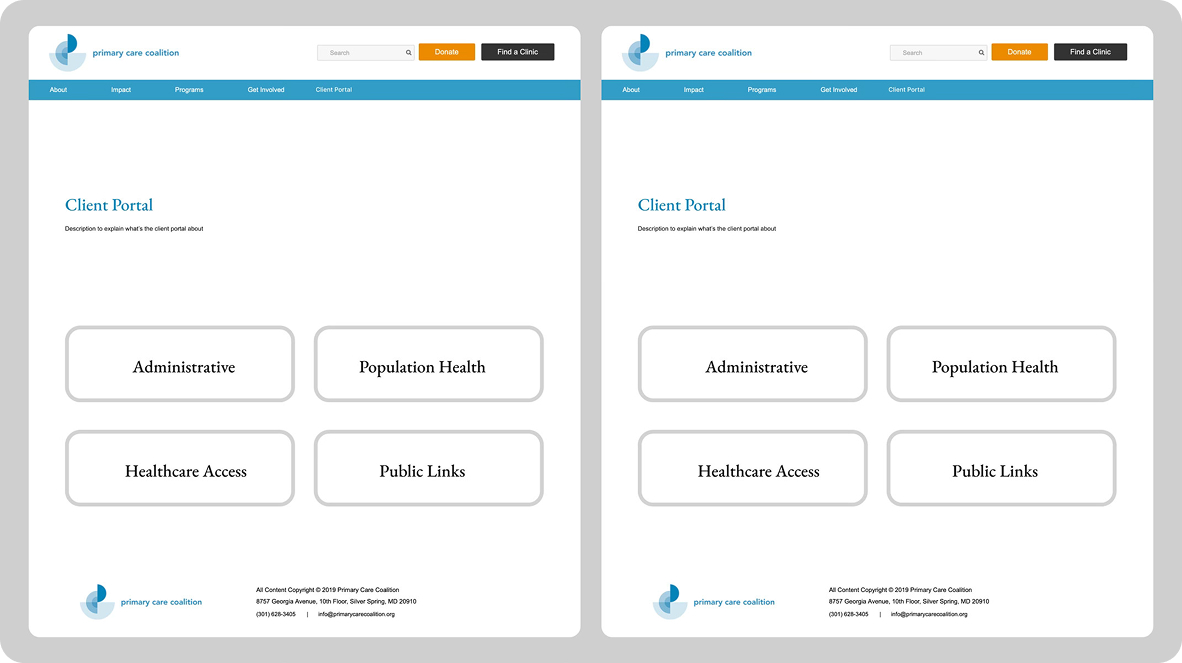
Weighing options against PCC’s real constraints — existing Microsoft licensing, HIPAA compliance, budget limits, and no dedicated internal IT team — we landed on a hybrid direction: keep SharePoint as the backbone and add a redesigned public-facing entry point on top of it. The first concept tested that idea by reframing the Client Portal as a clear, program-based landing page.
The hypothesis: if partners enter through one public page organized by program area — Administrative, Population Health, Healthcare Access, Public Links — they can self-serve to the right documents without staff manually re-sharing over email, while sensitive content stays gated behind SharePoint’s permissions.
Giving the structure real bones
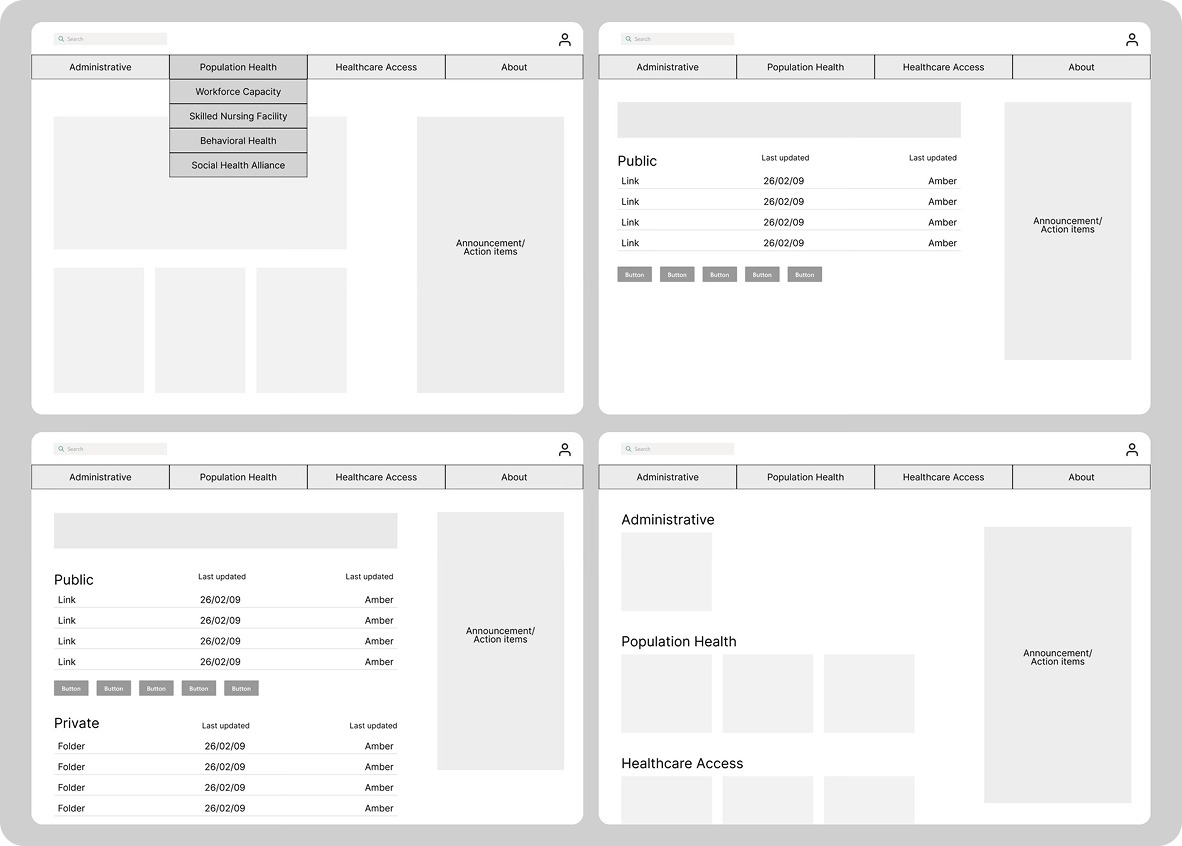
The mid-fidelity set translated the concept into a working information architecture. I laid out a persistent top navigation across the four program areas, a Public / Private split that mirrors SharePoint’s permission tiers, and a recurring “Announcement / Action items” rail so partners always know what changed.
This is the structural iteration step — resolving how content nests (program → subprogram → document library), where the Public/Private boundary sits, and what a partner sees before versus after authentication, ahead of any visual polish.
The most resolved deliverable
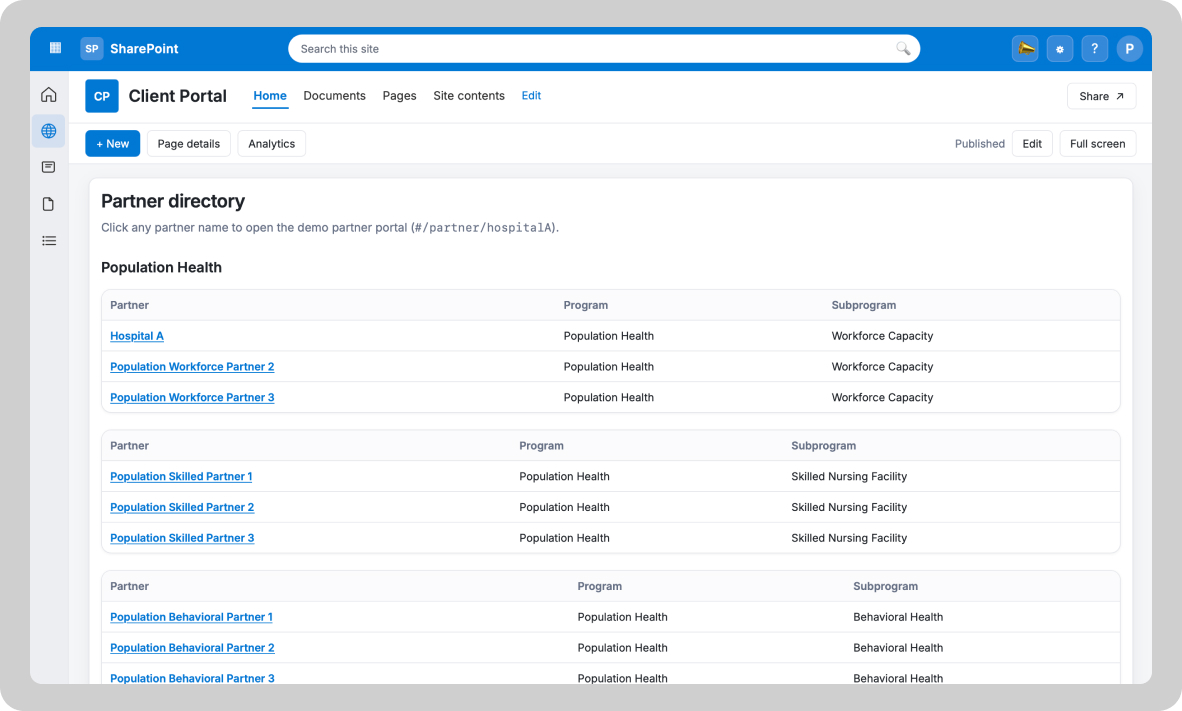
The high-fidelity design carries the wireframe structure into a working partner directory. Each program area opens into a clean, scannable table — partner, program, subprogram — where every partner name is a persistent link into the right SharePoint document library. No manual re-sharing, no chasing access codes.
This is the most resolved artifact produced for the engagement: a tested, presentable representation of how the redesigned portal behaves once a partner is authenticated and routed to their materials.
From email chaos to a gated, single entry point
The design’s real payoff is the workflow it replaces. The before state was a manual loop with no structure; the after routes every partner through one public landing page, hyperlinks into the right program, and an authentication gate that protects sensitive libraries.
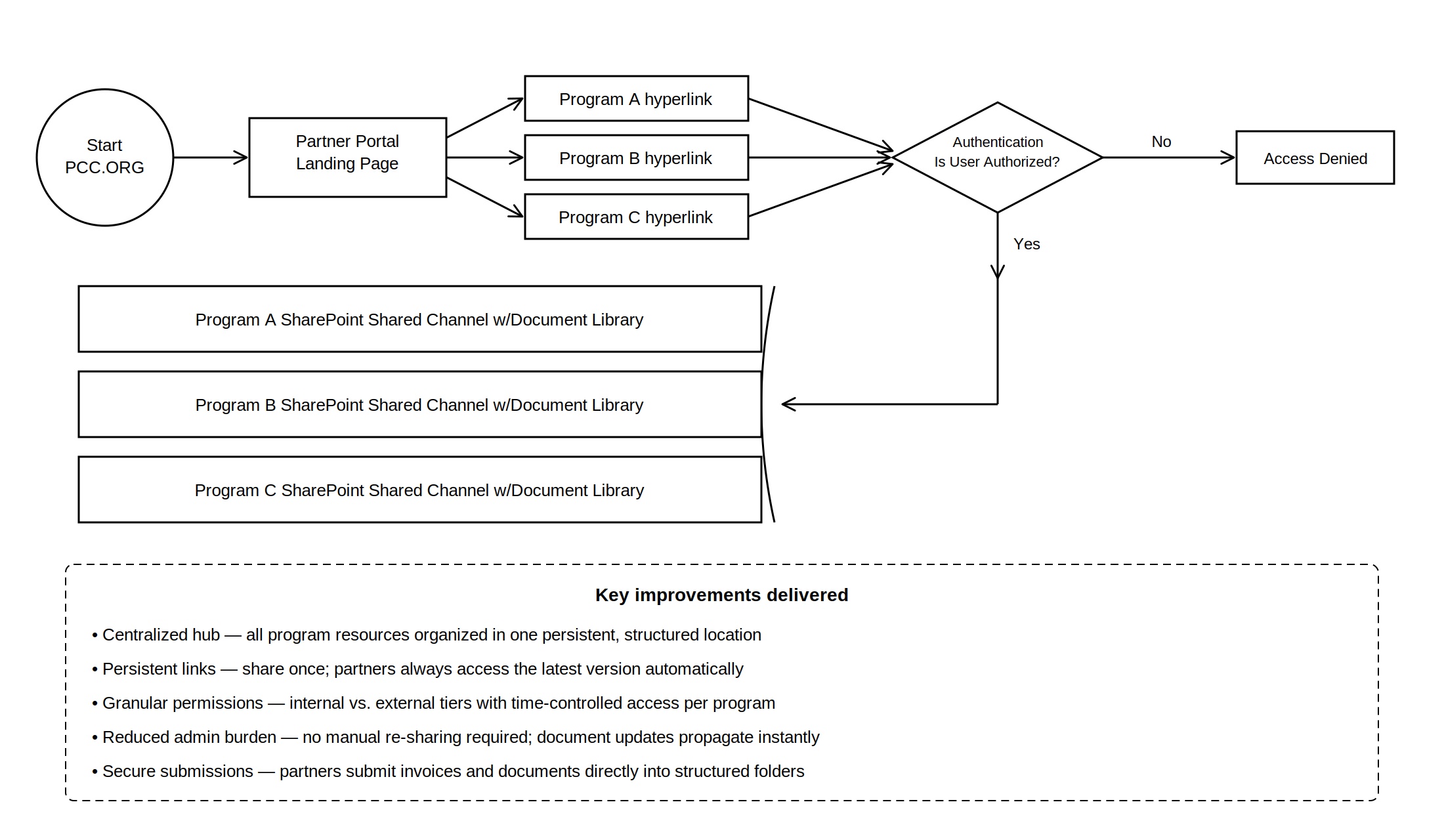
All program resources live in one structured location reached through persistent links — share once, and partners always get the latest version.
An authentication gate enforces internal-vs-external access per program, so a single entry point doesn’t mean exposed PII — with no manual re-sharing.
From ad hoc to accountable
A note on these numbers. The redesign has not yet gone live. The figures below are projected and estimated from usability testing and stakeholder review — they are not measured post-launch metrics. PCC owns implementation going forward.
Projected weekly time saved per staffer locating and re-sharing partner resources.
Estimated lift in task-completion against the tested build versus the current email workflow.
A defensible compliance posture. Stakeholders affirmed that routing PII/PHI through gated SharePoint libraries — instead of email — closes the highest-consequence risk identified in research.
Lower projected admin burden. Persistent links remove the manual re-sharing loop — the most-cited painpoint across both personas — in the tested workflow.
A maintainable handoff. Because the solution sits on PCC’s existing SharePoint and a designated internal owner, the organization can sustain it without new infrastructure, budget, or headcount.
What I’d carry forward
As Project Manager and UX Researcher, I owned sprint scheduling, client coordination, and the team’s Trello board, while leading interview recruitment and facilitation, affinity mapping, and usability testing coordination.
Constraints aren’t obstacles, they’re the design brief. The strongest solution wasn’t the most ambitious platform — it was the one PCC could actually maintain without new infrastructure or headcount.
Research only matters if it survives translation. Moving from interview themes to a defensible IA required constantly checking design decisions back against Eileen’s and Maria’s actual workflows.
The riskiest part of an integration is the seam, not the parts. Testing the public site and SharePoint in isolation wouldn’t have caught what testing the connection between them did.